Buying Tokens
Buying on Prismata means purchasing a bundle of tokens with ETH in a
single transaction. You choose a market segment, decide how your
tokens are selected, set your spend, and execute.
1
Choose a Market Segment
CMC100 for established tokens ranked by
market cap. Shitcoin Jungle for
high-risk plays — memecoins, microcaps, the weird stuff.
Full Spectrum for everything available
across all risk levels.
2
Build Your Bundle
Two modes. Choose for me picks tokens
randomly and splits your ETH equally — just set how many
tokens you want (3–15).
Let me choose gives you full control:
pick tokens manually or use selection tools (Random, Top
by rank, Bottom by rank, Custom), then set equal or
custom weight allocation across your selection.
3
Set Your Amount
How much ETH you want to spend — between 0.01 and 5.0
ETH per transaction. The USD equivalent is shown
alongside.
4
Set Slippage Tolerance
How much price movement you'll accept between preview
and execution. Default is 1%, which works for most
trades. You can manually set 0.5%, 1%, 2%, or 5% if
needed.
5
Preview & Execute
Review the trade preview showing your selected tokens,
expected amounts, and price impact. Click Execute, then
confirm the transaction in your wallet. Once confirmed,
your tokens are recorded on-chain.
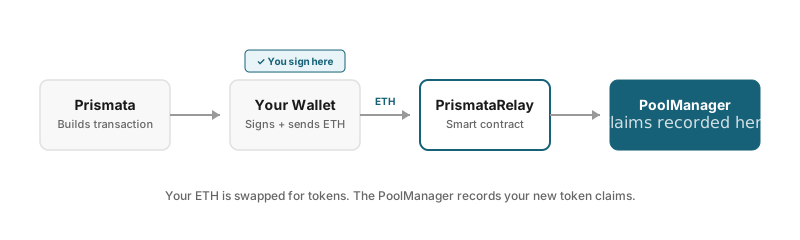
Your ETH is swapped for tokens. The PoolManager records your new
token claims.
💡 First Time?
You may need to approve Prismata as an operator first. This is a
one-time transaction that lets the relay contract interact with
the PoolManager on your behalf.
Selling Tokens
Selling converts your ERC6909 token claims back into ETH. You can
sell individual tokens or multiple at once.
1
Select Tokens to Sell
Choose from your holdings which tokens you want to sell.
By default, it sells your entire balance of each
selected token.
2
Review the Quote
See the expected ETH return. This is an estimate based
on current prices — actual amount may vary slightly.
3
Execute & Sign
Confirm in your wallet. ETH is sent directly to your
wallet address.
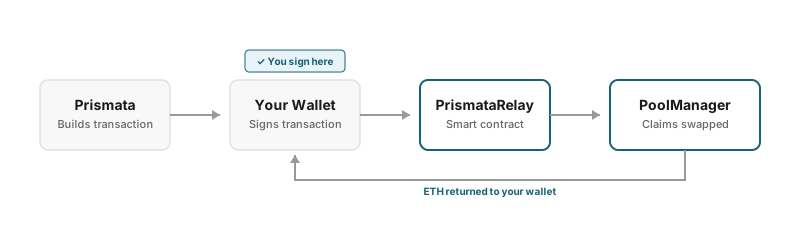
Your token claims are swapped back to ETH and returned to your
wallet.
Withdrawing Tokens
Withdrawing converts your ERC6909 claims into standard ERC20 tokens.
After withdrawal, tokens appear in your wallet and on Etherscan.
See Why Can't I See My Tokens? for more
on how ERC6909 works and why withdrawal is needed.
Key Terms
Slippage
The maximum acceptable difference between the expected price
and the actual execution price. Set higher for volatile
tokens or when trading large amounts. Default is 1%,
adjustable from 0.5% to 5%.
Price Impact
How much your trade moves the market price. Large trades in
low-liquidity pools have higher price impact. Tokens with
price impact above 5% are automatically filtered out.
Expected Output
The estimated tokens (buying) or ETH (selling) you'll
receive based on current prices. Actual amount may be
slightly different due to price movement between preview and
execution.
Minimum Output
The worst-case amount you'll accept, based on your slippage
setting. If the actual output would be less than this, the
transaction reverts.
Platform Fee
The fee Prismata takes on trades. Currently 0% during beta.
Displayed in the preview if applicable.
⚠️ Price Volatility
Token prices can change rapidly. The preview shows estimates
based on current prices, which update every few seconds. Between
clicking Execute and your transaction confirming, prices may
move. Slippage tolerance protects you from extreme moves, but
small differences are normal.
Troubleshooting
Transaction Failed
Common causes: price moved too much (exceeded slippage),
insufficient ETH for gas, or network congestion. Try again with
higher slippage or wait for a less busy time.
Tokens Not Showing
Remember: ERC6909 tokens don't appear in MetaMask. Check your
Dashboard to see your holdings. To get
tokens in your wallet, use Withdraw.
Stuck on "Confirming"
Wait for the transaction to confirm on-chain. This usually takes
12–30 seconds but can be longer during network congestion. Don't
refresh or navigate away — the Dashboard will update automatically.
If you do navigate away, the transaction still completes in the
background.